Context
TC Tools lives alongside TechCentral as the surface where content creators and operations staff actually do their work — before an article goes live, and after, when something has drifted.
The premise: the people writing the procedures shouldn’t need to file an engineering ticket every time they want to know whether their article will rank, whether their thumbnails are broken on prod, whether the French translation has lost its voice, or whether renaming a slug will quietly break a hundred internal links.
The brief
The brief was narrower than it looks:
- Reduce the editorial round-trip. Most “is this ready to publish?” questions can be answered without opening a ticket — if the editor has the right tool.
- Give content ops real diagnostics. Broken thumbnails, drifted DEV/PROD content, empty audiences, dead internal links — these were being discovered by technicians instead of by the people who could fix them.
- Use TELUS’s AI gateway responsibly. FuelIx (TELUS’s internal AI service) is the only sanctioned model surface; everything AI-shaped routes through it.
- No new system to maintain. No separate database, no parallel auth, no “second source of truth.” TC Tools sits over dotCMS and TechCentral; it doesn’t compete with them.
What’s in the toolkit
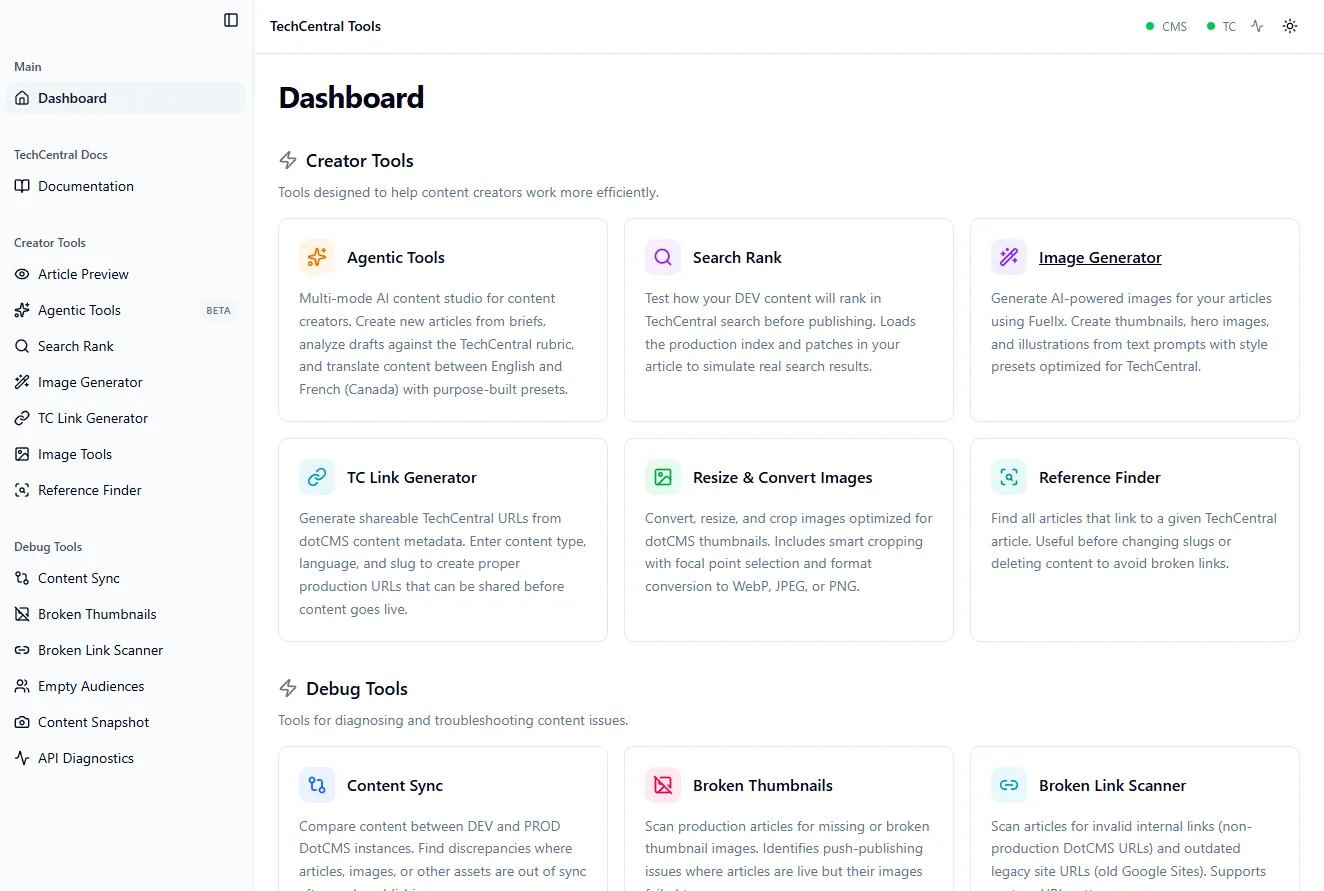
The dashboard splits into two clean halves: Creator Tools for the work that happens before publish, and Debug Tools for the work that happens after.
Creator Tools
- Search Rank — paste a draft, pick a query, see how the article would rank against the live TechCentral search index. Catches “no one will find this” before it’s a complaint from the field.
- Live Preview — pull an article from the DEV dotCMS instance and render it in the same template TechCentral uses. The preview is the reality, not an approximation of it.
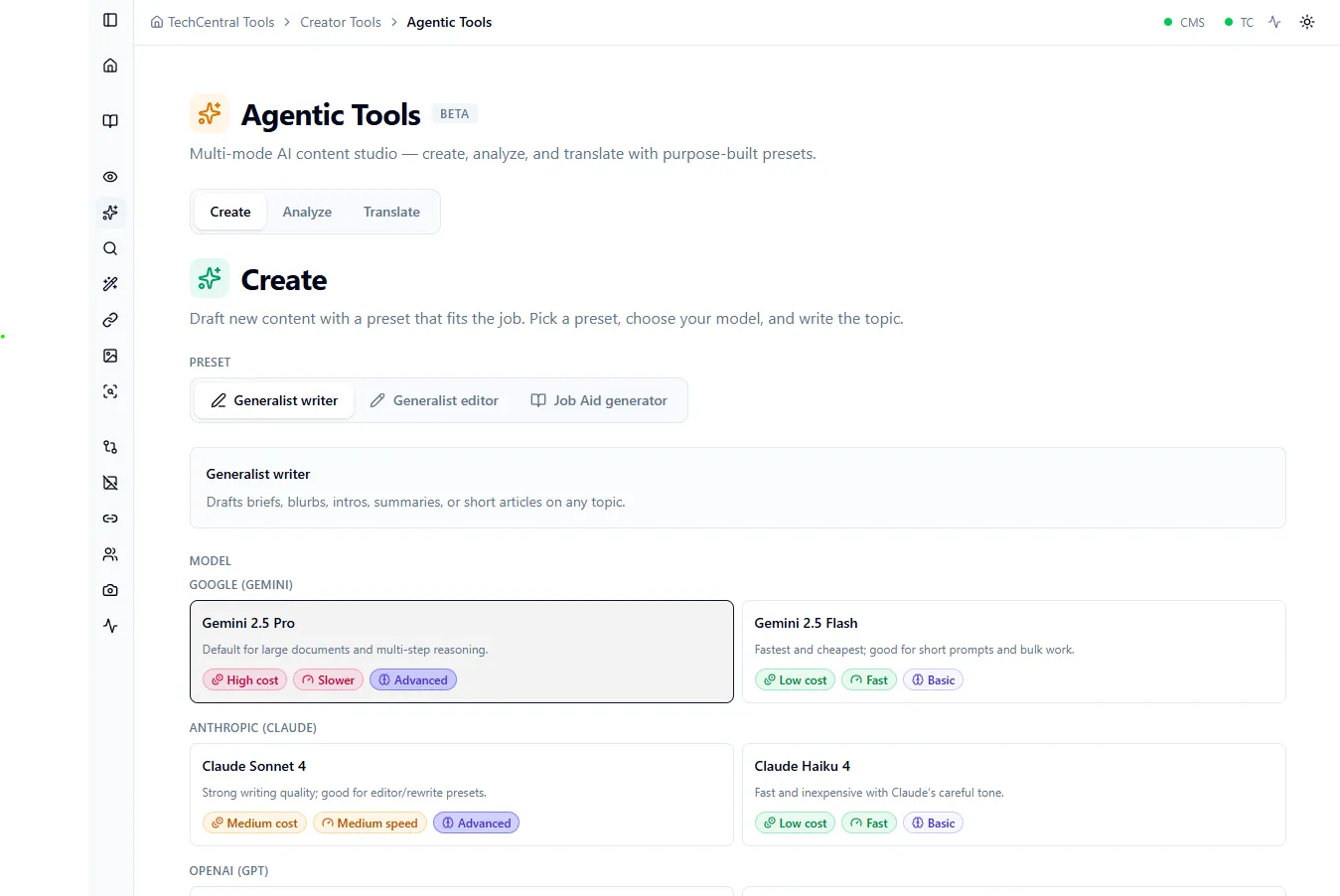
- Agentic Tools (BETA) — the multi-mode AI content studio. Draft from a brief, run an article against the TechCentral rubric (voice, clarity, accessibility), or translate between English (Canada) and French (Canada) with purpose-built presets that respect TELUS terminology.
- Image Tools — resize, convert (WebP / JPEG / PNG), and crop with smart focal-point selection. Sharp under the hood, optimized for dotCMS thumbnail conventions so editors don’t end up uploading 12 MB hero images.
- Image Generator — AI image generation through FuelIx, scoped to procedure-illustration prompts rather than a free-text playground. Output is more predictable, brand fit is enforced, and the cost surface is bounded. Currently in active development.
- TC Link Generator — generates correctly-shaped TechCentral URLs from dotCMS content metadata (type, language, slug). Stops the “why is this link broken on prod?” class of bug before it ships.
- Reference Finder — given an article, find every other piece of content that links to it. Run before renaming a slug or retiring a procedure, and the chain reaction stops being a surprise.
Debug Tools
- Content Sync — diff DEV against PROD. Surfaces articles, images, or assets that are out of sync after a partial push.
- Broken Thumbnails — scans production for missing or broken thumbnail references. Catches the “live but invisible” failure mode where an article publishes but its imagery silently 404s.
- Broken Link Scanner — finds invalid internal links and outdated legacy URLs (old Google Sites, non-prod DotCMS URLs) before a technician hits them in the field.
- Empty Audiences — flags articles that publish to an empty audience (no one will see them) — a common quiet failure of the personalization layer.
- Content Snapshot — captures point-in-time snapshots of content state for debugging publishing issues after the fact.
- API Diagnostics — internal probes for the underlying dotCMS / TechCentral APIs, so the first answer to “is the integration broken?” is data, not a guess.
System
A small set of admin tools (cache-reset, index-refresh) used by operations when content is published but isn’t propagating, without involving the development team for routine cache busting.
How the AI piece is built
The AI surfaces are intentionally narrow.
- One gateway, one provider boundary. Every AI call goes through FuelIx, TELUS’s internal AI service. The application doesn’t talk to model vendors directly. That keeps secrets, audit, rate-limiting, and provider strategy in one place owned by the people whose job it is to own that.
- Templated, not free-form. Image generation runs against a small, vetted set of prompt templates rather than a chat box; rubric analysis runs the same evaluation pipeline at draft time and at review time so the answer doesn’t change between writers.
- Bilingual evaluation. The rubric and the translation presets are built for EN-CA and FR-CA — the French translation gets reviewed against a French rubric, not an English one with a translated label.
How it’s built
The technical surface, briefly:
- Front end — SvelteKit 2 on Svelte 5 (runes mode), Tailwind 4, shadcn-svelte (Bits UI) primitives, Lucide icons. Fuse.js for the client-side fuzzy search across tools and content.
- Server — SvelteKit endpoints under
/api/*(health, AI, dotCMS, TechCentral, debug), with cleanly separated route groups fortools/,debug/,system/, anddocs/. - Image processing — Sharp on the server for resize / convert / crop, with focal-point handling for dotCMS thumbnail formats.
- Document parsing —
unpdffor PDFs,mammothfor DOCX,jspdfandjszipfor export. Editors paste the format they have; the tool handles the conversion. - Storage — none. TC Tools is stateless; the source of truth is dotCMS and TechCentral. Local-only state (recent inputs, cached lookups) lives in IndexedDB on the client.
- Secrets —
startup.jspulls from GCP Secret Manager intoprocess.envbefore SvelteKit boots, so the app never ships secrets through env files in the deployed environments. - Auth — Kong API Gateway in front of PingFederate SSO. The app trusts the JWT Kong sets and decodes it into request locals; there is no second auth layer to maintain. Local development uses a
DEV_ID_TOKENstand-in. - Deploy — multi-stage Docker (Node 24-slim, non-root) → Artifact Registry → GKE (
northamerica-northeast1) via Google Cloud Deploy, triggered from GitHub Actions on PR. PR builds deploy to the NP (non-production) cluster automatically and a bot comments the deployed image tag on the PR. - Quality gates — Vitest split into a server project (Node) and a component project (browser via Playwright Chromium), Playwright for E2E,
expect.requireAssertions: trueenforced across all projects so an empty test can’t pass silently.
Outcome
TC Tools is shipping in the working day, version 1.26 at time of writing, on a regular release cadence. What it changes:
- Editors answer their own pre-publish questions. Search rank, live preview, broken-thumbnail scans, and the rubric run inside the tool instead of in a ticket queue.
- Content ops finds its own bugs. The Debug Tools surface is the difference between “a technician told me the link was broken” and “we caught it Tuesday morning before anyone noticed.”
- AI usage stays inside the policy. Every model call routes through FuelIx; nothing goes direct to a vendor. That’s a real constraint and TC Tools makes it the easy path.
- No new system to operate. Stateless containers on GKE, no separate database, no parallel auth — operationally cheap to keep alive.
What’s next
- Image Generator to general availability — currently active development.
- Agentic Tools out of BETA, with the rubric and translation presets hardened against more edge cases.
- More debug surfaces as content-ops finds more classes of “quiet failure” worth catching.
For specifics on the AI integration, the FuelIx surface, the Kong/PingFed flow, or what running a stateless internal toolkit at this scale on GKE actually looks like — book a call.